Showing posts with label Schedule EIB. Show all posts

Thursday, 23 April 2020

Workday EIB - Inbound Validation Only mode

EIB - Inbound Validation Only mode

How to Run EIB Inbound in Validation mode:

When you want to load some data into Workday, you typically use the EIB Inbound. You know you will use the three phases involved in EIB - Get Data, Transform Data, Deliver Data.

Its always a good approach to run your EIB Inbound integration load with Validation Only Load.

This helps you in identifying the issues so that you can fix it and proceed with the actual load.
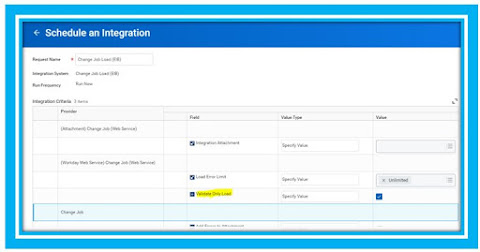
Below shown is the screen when you click on Launch/Schedule integration. Here is where you set the Validation Only Load. When you are comfortable with the load validation, in the next launch just make sure that you don't select so that your run will not be a Validation only but an actual load.


Workday EIB Inbound - Validation Mode Setup

Friday, 10 April 2020

How to Know When the Tenant is Available after Schedule Updates

How to Know When the Tenant is Available after Schedule Updates


Your tenants some times may be available before the scheduled end time.  If you would like to be notified when any of your tenants become available after a Weekly Service Update or a Workday Feature Release,

Follow the below sequence of steps in which ever tenant the notification is required:

  1. Create Custom Report - You can create your custom report with any report data source and fields. 
  2. Create a new EIB Outbound Integration and use the newly created custom report as the data source. No Transformation required.
  3. Use Workday Attachment as the Delivery Method.
  4. Set up the EIB Integration Notification (Trigger on Launch) to trigger when this EIB is launched. - Provide email IDs or Distribution list as who need to receive the notification also configure the Subject appropriately to indicate that your (PROD / Sandbox / Implementation etc.,) Workday tenant is available
  5. Schedule the EIB to run after the maintenance window begins.( Weekly Recurrence 6:30pm PT on Friday for Sandbox and 12:30 am PT on Saturday for Production) 
  6. When the service update is complete, the EIB will trigger automatically, and the notification email will be sent to indicate the tenant's availability.
Specially for Sandbox notifications, create the schedule in your Production tenant so that it copies over during the weekly Sandbox refresh.

Restricted to Environment - Sandbox  6:30pm PT on Friday
Restricted to Environment - Production 12:30 am PT on Saturday
    Workday is planning for zero downtime as part of roadmap so, the above process would no longer be needed for the users to configure.

    Workday Custom Reports

    Custom Reports Apart from  Workday - Standard Reports , Workday allows you to create Custom Reports. There are variety of reports that ...